
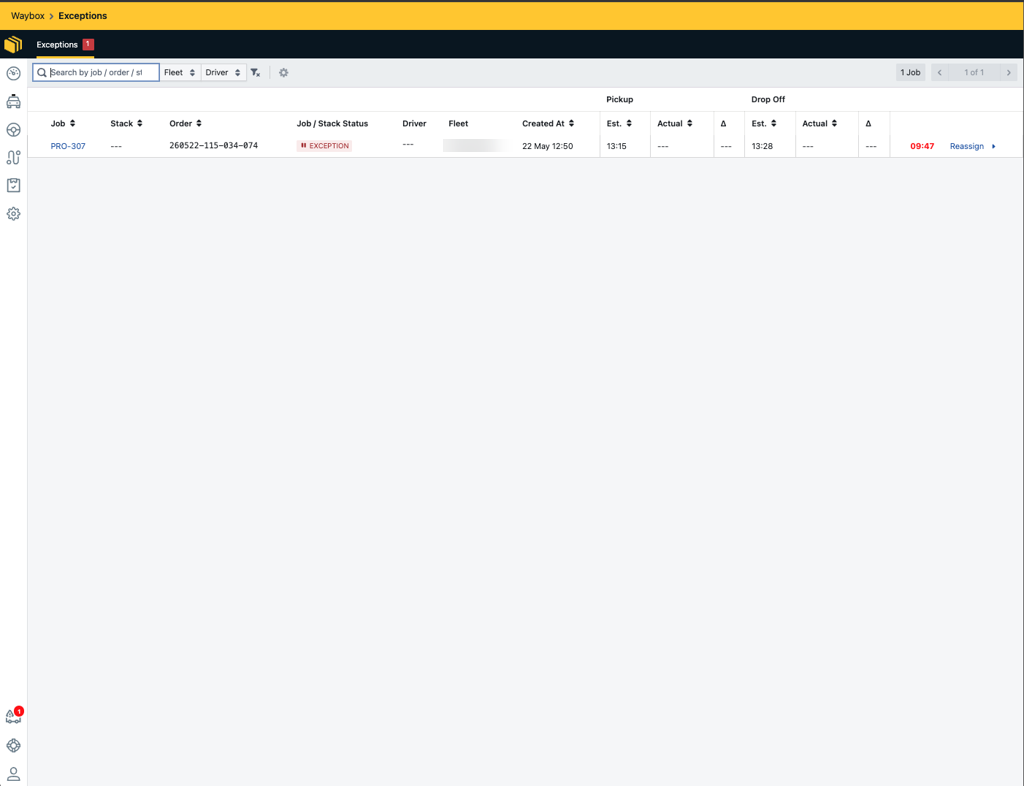
The system will automatically attempt to assign every job received to a driver. In the event of a job not being assigned to a driver, the job will be moved to the exceptions queue. The exceptions queue gives fleets manual control to review and reassign these jobs before they are cancelled.
Managing the Exceptions Queue
Setting Auto Cancel Jobs
Fleets can choose to either enable or disable ‘Auto Cancel Jobs’:
How to locate Auto Cancel Jobs: Waybox Management → Fleets → Select a Fleet → Details
-
Enabled - jobs that could not be assigned to a driver will be auto-cancelled.
-
Disabled - jobs that could not be assigned to a driver will be added to the exceptions queue and will require manual intervention from the Fleet manager. When disabled, the fleet should provide an exceptions queue wait time. This setting defines the number of minutes a job can remain in the Exceptions Queue before it is automatically cancelled. If the job is not resolved within this time, it will auto-cancel.
Assigning Drivers to Jobs in the Exception Queue
How to locate the Exceptions Queue: Waybox Management → Exceptions
Jobs that have not been assigned to a driver will display the exception status and will appear in the exceptions queue. Selecting the 'Reassign' button will display a list of available drivers, if any.
Once a job has been reassigned or has been cancelled, the job will be removed from the exceptions queue.