
The navigation icons below are based on Fleet User Access Level, other users may not have access to all of these icons. See User Access Level for more information.
All Fleets are set up and managed on the Waybox Management Portal. If you have multiple Fleets, they can all be accessed from the Fleet sections in the main navigation, just select the fleet you would like to edit.
Selecting a fleet will allow you to configure your marketplace settings. You will have the following tabs available to you:
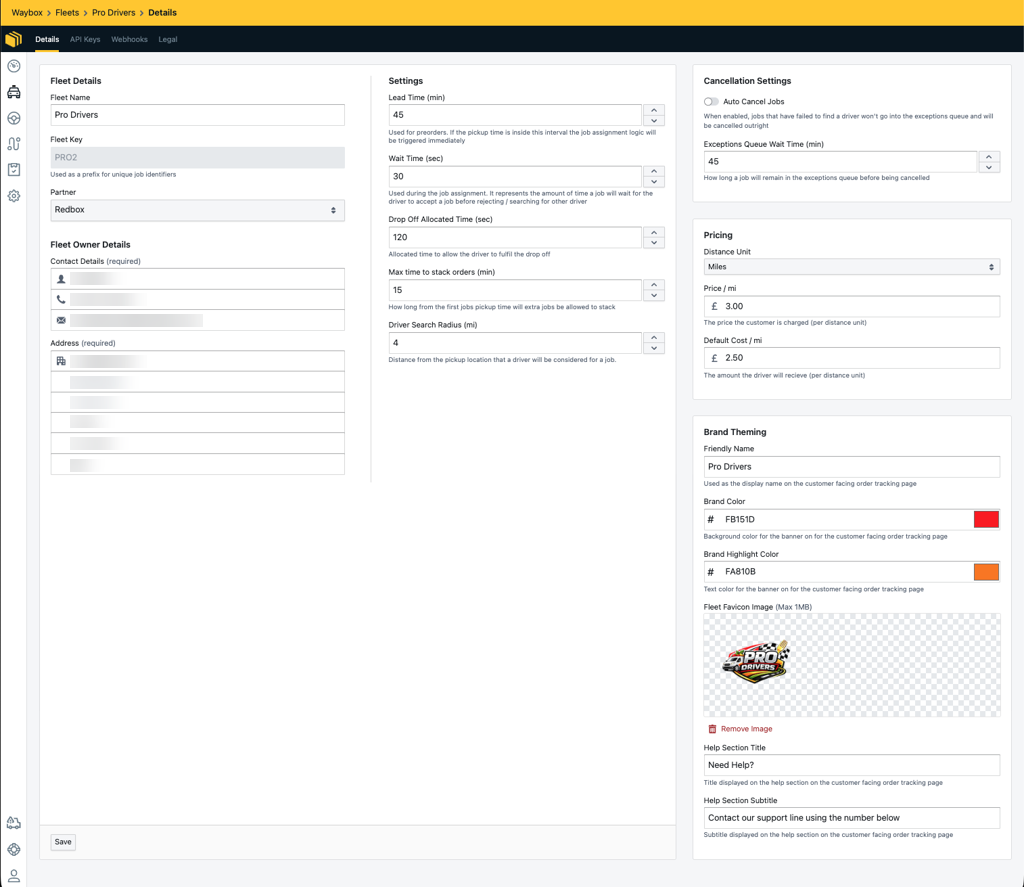
Details
All the required fleet information such as contact information can be updated from here. In addition to the fleet information, the following configurations can also be made from here:
-
Lead Time (min)
The amount of time from time which will allow the system to allocate drivers to jobs, jobs which are currently not within the lead time will only be assigned drivers once it is within the lead time. -
Wait Time (sec)
The amount of time a freelance driver will be given to either accept or reject the job before the system will auto-reject the job for this driver and proceed to allocate it to another driver. -
Drop Off Allocated Time (sec) -
The amount of time added to the job's calculated route/driving time. This is to allow the driver an allowance of time to collect the order from the pickup and to drop the order off with the customer. -
Max time to stack orders (min)
This setting defines the window the system uses to decide whether jobs can be stacked together. The window starts from the pickup time of the first job. Any additional jobs with pickup times that fall within this window can be automatically stacked with the first job. -
Driver Search Radius (mi/km)
This setting allows the fleet to define a search radius in miles for assigning drivers to a job. When a job is created, the system searches for available drivers within this radius around the outlet linked to the job. Only drivers located within the defined radius will be considered for assignment. -
Auto Cancel Jobs
When enabled, jobs that could not be assigned to a driver will be auto-cancelled. When not enabled, jobs that could not be assigned to a driver will be added to the exceptions queue and will require manual intervention from the Fleet manager.-
Exceptions Queue Wait Time (min)
This setting defines the number of minutes a job can remain in the Exceptions Queue before it is automatically cancelled. If the job is not resolved within this time, it will auto-cancel. See our Exception Queue guide for more information.
-
-
Distance Unit
The distance unit used, either miles or kilometres. By default, Miles will be selected. -
Price per mile
The price per mile or kilometre the fleet charges the customer, this is used to calculate the cost of delivery. -
Default Cost per mile
The default price per mile the fleet will pay the driver. This can be overridden on each driver.
API Keys
A list of generated API Keys.
Webhooks
A list of generated Webhooks.
Legal
Define the following Legal Documents:
-
Terms and Conditions
-
Privacy Policy
-
Cookie Policy
-
Misc Policy
Once the above documents have been set up, they will be visible to the drivers on the driver app.